
Last updated: October 15, 2026
Workflow Place helps you find a recipe for a real task, check its plan and connections, and adapt its request to your form. Browsing needs no login. Copying a prompt does not start continuous monitoring or scheduled execution. Run it in a supported connected AI chat and check the settings actually saved.
Choose in this order
- Open Workflow Place and choose your task category.
- Filter by Free, Standard or above, or Premium.
- Check whether the recipe uses FORMLOVA alone or external tools such as Slack, Sheets, a CRM or Figma.
- Read the steps and adapt the form, conditions, destinations and execution frequency.
Recommended order is editorial ordering. A heart saves a recipe for you; it is not a public popularity vote. Start with the work you need to do for the next response rather than a tool count.
Begin free with a survey follow-up draft
Survey Response Follow-up is a Free recipe. Reviewing responses and drafting follow-up is different from automatically sending email. Without actual responses, begin with a draft and an evaluation checklist.
Adapt one recipe to your own process
The following is a proposed trial request, not a result measured for this article. Use a test form before changing an existing live form.
Create a private satisfaction survey draft asking for a rating and reason. Use the survey follow-up approach to propose review points and reply drafts for low, middle and high ratings. Label any invented response as a hypothetical example, not retrieved data. Do not publish, send email or configure continuous monitoring.
Check the output before proceeding:
- Are rating ranges and missing answers handled explicitly?
- Do proposed replies use only the response facts?
- Are drafts distinct from sent email, and single runs distinct from saved automation?
Try your first operations recipe with a free draft
Free lets you inspect the form and follow-up drafts. Custom automatic replies and reminders require the relevant Standard-or-above capabilities.
Create an account, verify your email, connect FORMLOVA to a supported AI chat, then paste the proposed request above. Review the saved draft before publishing.
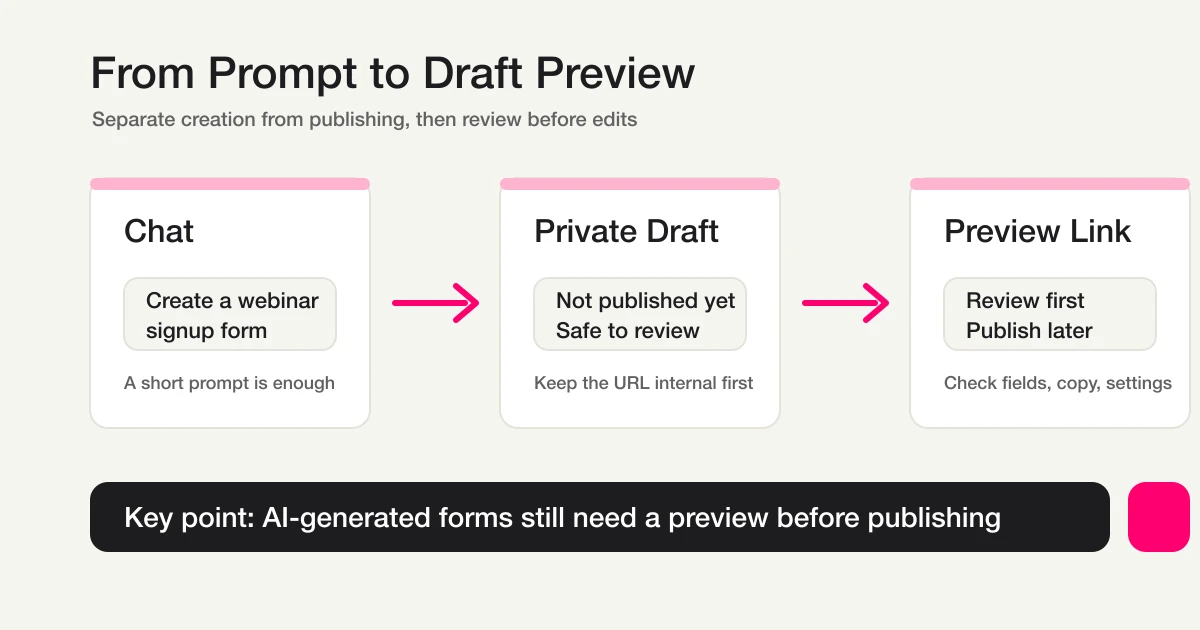
This existing draft-flow diagram illustrates the same check: inspect the saved object and preview, rather than relying on a chat confirmation.
What to check after pasting
A recipe may still need the form, fields, conditions or destination. Supply those inputs rather than letting the client guess. Cross-service recipes also need the external service's supported tools, permissions and account.
| Claimed result | Evidence to inspect |
|---|---|
| Draft created | Form name, fields, validation and preview |
| Rule saved | Actual form, conditions, action and enabled state |
| Single run completed | Target count, results, failures and unprocessed items |
| Scheduled/automatic work configured | Saved time, timezone, trigger and stop procedure |
| Email sent | Execution/send result, separately from delivery or receipt |
FORMLOVA-only describes the services involved. It does not mean that a one-time response lookup or reply-drafting recipe keeps running unattended. Distinguish chat-triggered external MCP actions from automation actually saved in an external service too.
Official starting recipes and current plan requirements
| Recipe | What to inspect | Required plan |
|---|---|---|
| Event Reminder + Follow-up | Event time, recipients, reminders and send configuration | Standard or above |
| Slack Notification + Sheets Log | Connected destinations and single-run execution; not native continuous sync | Free; external-service conditions apply |
| Inquiry Auto-reply + Escalation | Reply, owner and escalation conditions | Standard or above |
| Survey Response Follow-up | Response review, grouping and reply drafts | Free; automatic sending has separate requirements |
| AI Response Report | Summary/document creation through AI chat and external tools | Free; external-service conditions apply |
These are recipe-definition requirements. Adding native detailed analysis, continuous Google Sheets sync or email sending applies the requirements of that additional feature. A Free recipe is not a way to unlock paid operations.
Save for yourself or publish a recipe
Use a heart to revisit a recipe. It is stored with your account when signed in or locally in the browser when signed out.
User workflow publication has a minimum quality gate: ten actual firings, at least two steps, and a description. It does not guarantee every recipe succeeds in every environment. A privately saved recipe and a published recipe are different states.
A practical next step
Choose one recipe, identify its form and expected output, then try a small single run. Once you can explain which settings were saved and which actions require another chat run, decide whether to add email or an external system. See the automation guide and response handoff guide for the wider setup.
Further Reading and Original References
- MCP Form Service Guide
- Automatically Route Inquiry Forms by Content
- NPS Form Template
- Most Form Tools Stop at Creation -- FORMLOVA Starts After Publish
- Get started free
- Setup guide
Disclosure and Verification
Official recipe definitions and plan requirements were checked on October 15, 2026. The request above is a proposed trial, not a measured execution result.
