
Last updated: October 15, 2026
To hand responses to sales, check the respondent’s stated request and timeline, isolate the relevant records, and prepare a summary the next person can act on. FORMLOVA retrieves and filters the responses; your connected AI client can draft the message. Preparing a draft and delivering it through Slack or email are separate steps.
Collect A Stated Request Before Assigning Priority
Use an explicit question such as “What would you like next?” with meeting, materials, and researching as choices. A selected answer is a fact; an AI inference about buying intent is a proposed interpretation. Keep the two separate.
For a first test, ask:
Draft an inquiry form with required name and current request
(meeting / materials / researching), optional organization, timeline, and comment.
Show the draft before publishing. Do not send messages or enroll anyone in a campaign.
Review and publish it, submit one fictional response per request, and ask:
Retrieve these test responses and group them by the selected current request.
Show the matching response IDs and the source answers for the meeting group.
Draft an internal handoff with the request, timeline, uncertainty, and next action.
Leave missing information as unknown. Do not send the draft.
Response collection, lookup/filtering, and internal status management are available on Free. The connected AI client drafts the summary; this is not a server-side automatic lead-scoring service. Confirm the source records and keep contact details out of the draft unless the recipient needs them.
Try turning a meeting request into a reviewed handoff
Use three fictional responses to find the meeting request and prepare an internal draft from the saved facts. The free test stops before external delivery.
Sign up free to try inquiry triage
Sign up, verify your email, and connect a supported AI client. Use the draft request above, review it, and publish a test form when ready. Your AI client’s access and fees follow its provider’s contract.
The earlier published demonstration used 24 responses, grouped as 5 meeting/demo requests, 7 reviewing materials, 6 comparing options, and 6 not considering. Those are demonstration counts, not current usage, conversion performance, or expected results for your form. For the basic record handling, use view, filter, and update response status.
Once You Isolate the High-Intent Group, the Next Move Becomes Clear
After the distribution was clear, the next prompt was:
Show me only the responses from people who want to consult immediately or want a demo.
The earlier demonstration returned five matching respondents. For a new run, retrieve the source records and check their current answers rather than relying on an old list in the conversation. In this example, the output included:
- name
- company
- job title
- implementation timeline
- comment
That makes the result operationally meaningful. It is not enough to know that someone selected the high-intent option. To move quickly, the team needs to see who they are, what role they hold, how soon they want to move, and what they are actually asking for.
In this example, two respondents stood out as the most urgent:
- Olivia Carter
- Sophia Nguyen
Both selected Immediately as their timeline, and both left concrete comments explaining the pain they want to solve. At that point, the workflow has already moved past inspection and into prioritization.
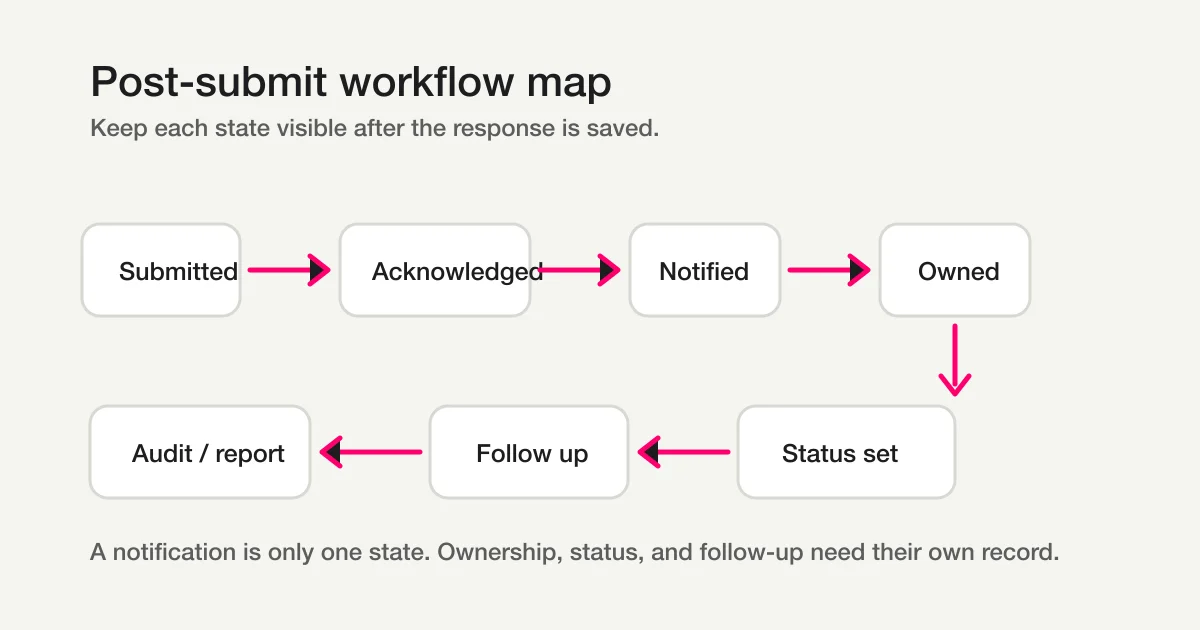
The next action needs a recorded outcome. A message draft does not establish the notified or owned stages in this operating map.
You Can Then Draft a Sales Notification Immediately
Next, I narrowed the action to the top two respondents and used this prompt:
Draft a notification for the sales team about Olivia Carter and Sophia Nguyen, and prepare it in a form that can be sent after confirmation.
The connected AI conversation produced a notification draft to review. It included a subject line, a short explanation of why the two leads matter, profile details for each person, and a suggested follow-up time. That suggestion is an operating choice, not a measured rule that predicts conversion.
The next check is the delivery route. Preparing this draft does not send it. Confirm the recipient, the channel connection, the fields included, and the required plan before any delivery. Free response notifications are a six-hour digest and do not consume the email quota. The Free plan separately allows 100 quota-counted emails per month. The digest is not an immediate hot-lead alert. Custom email and detailed analysis require Standard, while bulk campaigns, sequences, and team management require Premium.
That is the most important moment in this flow. The product is not stopping at “here are your responses.” It is turning the response into the next action.
Whether the message is ultimately sent through Slack, email, or another channel is not the key point. The key point is that the hottest leads are surfaced in time and packaged for action before they go stale.
That is what post-publish form operations actually look like.
In Clients Like Claude, You Can Even Visualize the Distribution Inline
If you are using a client like Claude, you can take the flow one step further.
For example:
Could you please create a graph showing the distribution of temperature levels and display it here for me?
In the previously published example, the client displayed an inline chart for those 24 demonstration responses. Chart rendering depends on the AI client’s features and plan; it is not guaranteed by FORMLOVA registration. The result made the intent distribution visible immediately:
- consult immediately / demo: 5
- reviewing materials: 7
- comparing options: 6
- not considering: 6
This is not required for the workflow to work. But it is a useful extension when you want to understand the shape of the pipeline at a glance instead of reading only tables. For weekly reporting or sales meetings, the guide to export responses to CSV or sync them to Google Sheets explains how to carry the response data into a shared table.
The Point of This Flow Is That the Work Continues After Publish
The flow in this guide is simple:
Summarize responses by intent.Show me only the responses from people who want to consult immediately or want a demo.Draft a notification for the sales team about Olivia Carter and Sophia Nguyen, and prepare it in a form that can be sent after confirmation.
And if you want a visual summary, a fourth step can be:
Could you please create a graph showing the distribution of temperature levels and display it here for me?
The sequence explains how to keep response review and draft preparation together. In your test, verify each source record, the draft, and any separately authorized delivery result. You can see the responses, route them by intent, and act on the ones that matter first.
That is what after publish means in practice.
If you want to design this sales handoff together with confirmation emails, response statuses, category routing, and Google Sheets sync, return to the parent form automation guide and place hot-lead routing inside the larger workflow.
Related Articles
- FORMLOVA Form Automation Guide -- Auto-Replies, Routing, Sheets Sync, and MCP Operations
- Set Up Inquiry Auto-Routing With FORMLOVA Workflows
- Find a Recipe in Workflow Place and Set It Up From Chat
- Webinar Registration Management: Signup, Reminders, Attendee Lists, and Follow-Up
- Contact Form Template -- Fields, Privacy Notice, Auto-Reply, and Routing Structure
- Form Creation Guide -- Choose Templates, Fields, and Workflows
Related next steps:
- MCP form service guide
- Most Form Tools Stop at Creation -- FORMLOVA Starts After Publish
- MCP Form Service Guide
- View, Filter, and Update Response Status
- Most Form Tools Stop at Creation -- FORMLOVA Starts After Publish
On October 15, 2026, plan boundaries and the corresponding current tool implementations were checked for this rewrite. Existing screenshots and demonstration counts are retained as previously published examples, not new execution results. New draft requests are proposed tests; the saved responses and any delivery must be verified in your own run.
Disclosure and Verification
This article is part of the FORMLOVA product blog. The author is the developer of FORMLOVA. Product facts, pricing, limits, and comparison claims should be checked against the current FORMLOVA spec, plan definitions, and relevant primary sources before publication or major updates. For privacy, hiring, legal, medical, or financial workflows, follow your organization's policies and specialist review.
