
Last updated: October 15, 2026
Before publishing in FORMLOVA, open the form and completion-page previews and review access, duplicate prevention, and the privacy-policy decision. A first publish request for an unreviewed draft returns missing requirements; that is a different stage from the final request for a form whose review is complete.
This guide retains a historical publish-flow observation and adds a trial prompt and decision checklist for your own draft. You can start with free form and screen review without configuring email delivery.
An Unreviewed Draft Returns Missing Requirements First
The starting prompt in this example was simple:
Please publish this form.
FORMLOVA did not respond with a live public URL right away.
Instead, it replied that some items needed to be confirmed before publishing. That is the key behavior to understand. Publishing is not treated as an unchecked final step. It is treated as a review stage.
In this example, FORMLOVA first returned two preview links:
- the main form preview
- the thank-you page preview
It then asked for two additional confirmations:
- which duplicate-prevention rule to use
- whether there was a privacy policy URL
The current flow also requires a decision about automatic sales-message detection. Privacy handling includes an explicit required/not-needed choice, with the appropriate policy URL when required. Treat the observation below as an example rather than the complete current checklist for every form.
That means the publish flow starts with review, not execution. I think that is exactly the right order for a form that is about to go public.
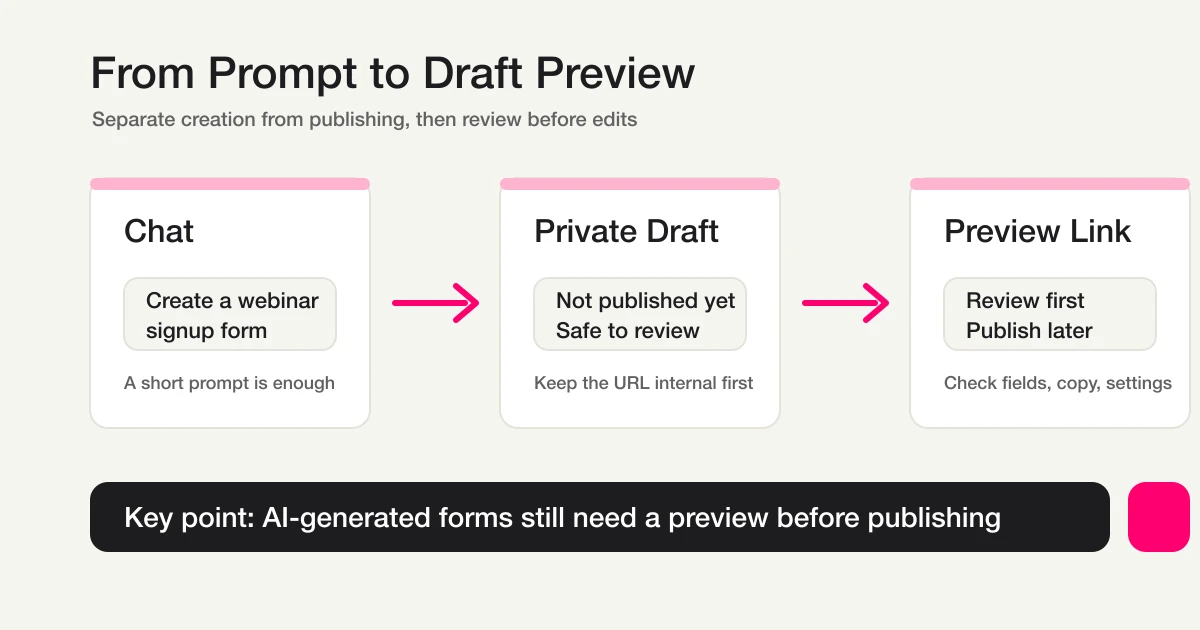
This existing explanatory diagram illustrates the draft/preview boundary; it is not a screenshot of the historical publish conversation.
FORMLOVA Asks You to Review Both the Form and the Thank-You Page
One of the strongest parts of this flow is that the review is not limited to the form itself.
In this example, FORMLOVA explicitly asked for confirmation of both:
- the form preview
- the thank-you page preview
That matters because the thank-you page is part of the user experience too. It is where the user sees what happens after submission, what was completed, and what they should expect next. A lot of people remember to check the form but forget to check the post-submit experience. The detailed message framework is in the Form Thank You Page Guide. FORMLOVA does not let that second surface disappear from the process.
I think this makes the review feel more complete without making it feel heavy. It still happens in chat, but it covers both the before-submit and after-submit states.
That is one of the best things to show in this guide. Publishing is not just "is the form ready?" It is "is the full submission flow ready?"
The Remaining Required Items Are Filled One by One
After the previews were confirmed, the next user message in this example supplied the privacy policy URL and confirmed that both previews had been checked.
FORMLOVA then replied with only the remaining unresolved item:
The duplicate prevention setting is still missing. Which would you like to use: email-based, cookie-based, or none?
That response pattern is very useful.
Instead of restating everything in a vague way, FORMLOVA narrows the next action to the one thing still needed. In this case, the next reply selected email-based duplicate prevention, and that completed the remaining requirement.
This is what makes the review flow feel manageable. It does not dump a static checklist on you and expect you to figure out what to do next. It moves forward one open decision at a time.
For a publishing workflow, that is a strong design choice. It keeps the process clear without forcing the user into a separate settings interface.
The Final Confirmation Comes Back as a Clear Summary Table
Once all required items were filled, FORMLOVA returned a final confirmation table summarizing the current settings.
In this example, the summary included:
- access: anyone with the URL
- duplicate prevention: email-based
- privacy policy: the supplied privacy URL
- auto-reply email: enabled
After that, FORMLOVA made the final step explicit:
Reply with “Publish” and I will publish it immediately.
I think this is one of the strongest moments in the flow. The conversation stays lightweight, but the final decision becomes very easy to inspect. You can look at the table once, confirm that the settings are correct, and only then proceed.
Just as importantly, the form is still not public yet at this stage. The review and the execution are separated. That boundary matters. Especially for a public action, I think the product should pause once, show the state clearly, and ask for explicit confirmation.
That is exactly what happens here.
Try the review with a small free draft
If you do not have a form yet, start with a three-field test inquiry form. This is a suggested trial, not an observed result from this revision:
Create an unpublished test inquiry form with required name, email, and message. Set the completion page to confirm receipt and say that our team normally replies within two business days. Do not configure auto-reply email. Show the form and completion-page previews, and do not publish yet.
Open the previews yourself; do not ask the AI to mark them reviewed on your behalf. Check:
| Area | Decision |
|---|---|
| Form and completion page | Readable on mobile and desktop, with correct required fields and timing |
| Access | The intended audience matches the distribution method |
| Duplicate prevention | Email, browser cookie, or no restriction fits the process |
| Privacy | Decide whether a policy is required and use the policy applicable to your own operation |
| Sales-message detection | Explicitly choose enabled or disabled |
| None for this trial; review plan and recipient conditions separately if needed |
Creation, preview, publication, response collection and search, and CSV / Excel export are available on the free plan. Custom auto-replies and reminders require Standard or higher. The enabled email in the historical example does not mean customized auto-reply configuration is free. Your AI client's conditions and fees apply.
Inspect both sides of submission before publication
Draft an inquiry form for free and review its previews and publication conditions. Decide whether to publish after inspecting the actual screens and settings.
Sign up free to try publish review
Register, verify your email, and connect FORMLOVA to a supported AI chat. Create the draft with the prompt above. Preview submissions are not saved; make the final publish request only after review.
The Public URL Only Appears After the Final Explicit Publish Step
After the final confirmation table, the next user message in this example was a clear publish instruction.
FORMLOVA then replied with the public result:
Published.
Form URL: https://formlova.com/WK7KofV_Ap
That sequence creates a very clean publish flow:
- request publishing
- review the form preview and thank-you preview
- fill the remaining required settings
- inspect the final summary
- explicitly confirm publishing
- receive the public form URL
That is what I think a good chat-based publishing flow should look like. It is still fast, but it does not skip the parts that protect the quality of the launch.
After Publishing, You Can Also Ask for an iframe Embed Code
This URL and embed example concerns a published form that does not charge respondents. The current shared MCP tools do not return paid-form purchase URLs or embed code.
One useful follow-up is that the flow does not stop at the public URL. In this example, the next prompt was:
Can this form be turned into an iframe?
FORMLOVA then returned an embeddable iframe snippet directly in chat. The output looked like this:
<!-- FORMLOVA Embed -->
<div style="width:100%;max-width:640px;margin:0 auto;">
  <iframe
    src="https://formlova.com/WK7KofV_Ap?embed=1"
    width="100%"
    height="600px"
    frameborder="0"
    style="border:none;border-radius:8px;"
    allow="payment"
    loading="lazy"
  ></iframe>
</div>
<script src="https://formlova.com/embed.js"></script>
That is a good continuation of the workflow. FORMLOVA does not just return the public URL and stop there. It can keep going into the next practical step, which in many cases is embedding the form into a website or landing page.
The nice part is that the response is immediately usable. You can paste it into your site's HTML, and embed.js handles automatic resizing based on the form content. And if you want a different presentation, such as a popup-style embed, that can become the next prompt in the same conversation.
That is part of what makes the product feel cohesive. Publishing is not treated as the end of the task. It is treated as the transition into the next action.
These Are the Four Things to Remember
If you only want to remember the essentials from this guide, keep these four points:
- an unreviewed draft returns its missing requirements first
- you should review both the main form and the thank-you page
- access, duplicate prevention, privacy, and sales-message detection must be decided before launch
- the final public URL is returned only after explicit confirmation
That is the shape of the workflow.
And it fits naturally after the earlier steps in the series. First create the form. Then match the design. Then prepare the auto-reply and the thank-you page message. Then move through the publish review and launch with confidence.
Start with the test draft above, open both previews, and compare the saved publication conditions with your instructions. Resolve the outstanding items before requesting publication for that specific form. Then open the returned public URL under the intended respondent conditions.
Related Articles
- View, Filter, and Update Response Status
- Create and Refine Auto-Reply Emails
- Create and Publish a Webinar Registration Form
- Most Form Tools Stop at Creation -- FORMLOVA Starts After Publish
Disclosure and Verification
This article is part of the FORMLOVA product blog. The author is the developer of FORMLOVA. On October 15, 2026, publish-gate requirements, actual preview review, non-saving preview behavior, and plan definitions were rechecked. The historical observation and its URLs remain examples from that time; the new trial prompts have not been executed for this revision. For privacy, hiring, legal, medical, or financial workflows, follow your organization's policies and specialist review.
