
Last updated: October 15, 2026
Start Microsoft 365 inquiry management by separating Forms for intake, Lists/SharePoint for the record, Teams for notification, and Power Automate for integration. If Outlook handles replies, return the handling record to the source of truth. A Teams post alone does not establish ownership, deadlines or completion.
Allocate the roles
| Job | Candidate | Organizer decision |
|---|---|---|
| Intake | Microsoft Forms | Fields, audience and sharing |
| Record | Lists/SharePoint/Excel | Identifier, owner and due time |
| Notification | Teams/Outlook | Minimum necessary content |
| Reply | Outlook etc. | Reply evidence and remaining work |
| Integration | Power Automate | Owner, authorization, failures and retries |
Microsoft documents response review/Excel output and a new-response trigger plus response-detail retrieval in Power Automate. Check the actual connectors, licensing and organization/DLP policy.
Basic Power Automate flow
- Trigger on a new response to the chosen form.
- Retrieve its details.
- Create a record with an identifier to prevent duplicates.
- Send a minimal Teams summary and authorized management link.
- Update ownership, deadline and next action in the source.
- Record failures and verify duplicate behaviour before retrying.
Do not copy full messages, phone/address data or attachments into a broad channel unnecessarily. Review sensitive details in the authorized source.
Test an intake that fits Microsoft 365 roles
This is a proposed trial, not an operation or result measured for this rewrite. Use a private test draft first.
Create a private external inquiry draft in FORMLOVA with name, email, category and message. Propose a mapping where Lists is the operating ledger and Teams receives a summary. Do not invent a native FORMLOVA owner column; keep owners/dates in retained notes/tags or external columns. Do not connect external services, publish or send.
Before proceeding, check:
- Are source-of-truth, synchronized fields and retained management columns clear?
- Are privacy exclusions and management-link access decided?
- Can the intake be checked on mobile and desktop?
Compare a free intake while retaining Microsoft 365
Free covers drafts, response review/status and export. Teams/Lists integration needs separate setup and permissions; custom replies/CRM mapping have paid eligibility.
Register, verify your email, connect a supported AI client, and paste the proposed request above. Check the saved draft before publishing. AI-client account and usage requirements apply separately.
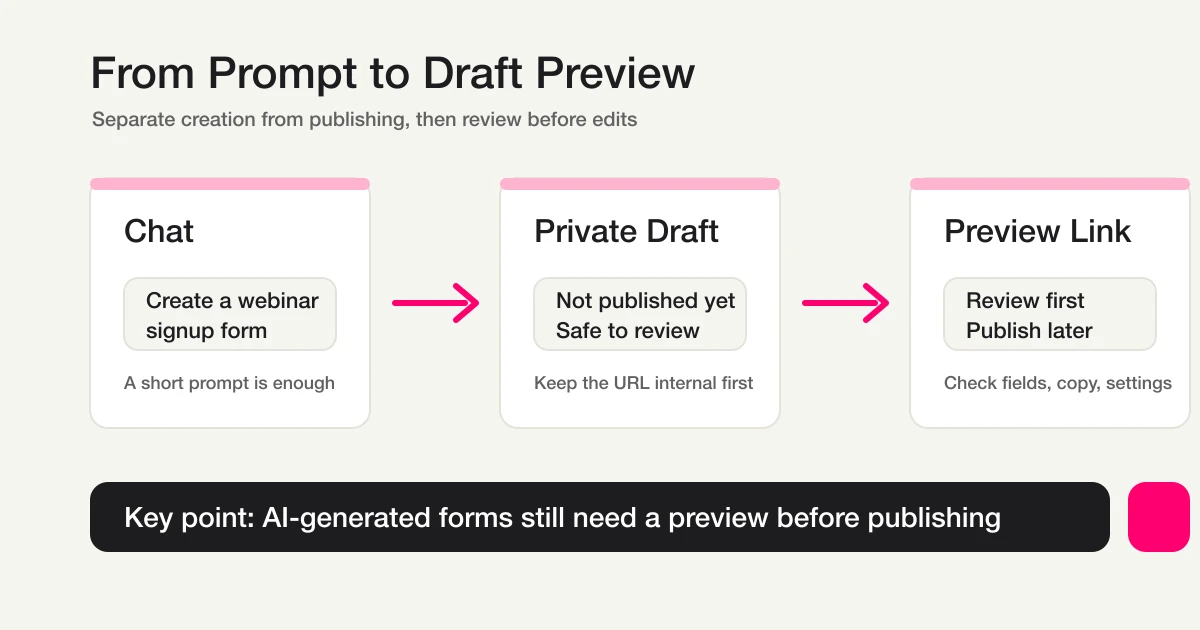
This existing conceptual diagram shows the draft-checking stage; it is not a screenshot or measurement of this article’s proposed test.
Where FORMLOVA fits
Internal collection may work well entirely in Microsoft Forms. Consider FORMLOVA when you want to create the external intake and review responses from AI chat, and compare the actual job rather than assuming a replacement.
FORMLOVA uses new / in_progress / resolved / spam. Ownership and dates belong in retained notes/tags or Lists columns, not an assumed native owner field or arbitrary status. Identify actual targets, save changes and retrieve again. Basic CSV/Excel has response fields and submission time, not response-ID/status columns.
Verify integration rather than the proposal
Registration alone does not continuously sync to Teams/Lists. Configure a supported webhook, MCP or Power Automate path, including destination, authentication, mapping, trigger, duplicate handling and failures. Use service authentication screens rather than pasting secrets into chat.
MCP email/phone displays are masked. Do not infer raw values for external joins or recipients. Use authorized full exports or server-side integration. A webhook ping verifies connectivity, not successful automatic synchronization of every response.
Plan and notification boundaries
FORMLOVA Free includes creation, response search/status and CSV/Excel. Free response notification is a six-hour owner digest outside outgoing-mail quota; it does not use per-form destination settings. Email routing/custom replies, CRM mapping and native Sheets sync require Standard or above; teams require Premium. Microsoft 365 licensing applies separately.
Operating checks
Check unmatched categories, ownership gaps, overdue work, duplicate execution, disconnected accounts, departed flow owners and record/channel access. With a published form, compare actual storage and integration results. Notification is not resolution, and preview is not a live storage/sync test.
Questions and decision
Can Teams alone manage it? It can provide lightweight signals; a structured source for owners, deadlines and remaining work is easier to maintain.
Must I replace Microsoft Forms? No. Retain your current setup and compare one intake/review task.
Allocate roles first, then test field-to-ledger mapping with the private draft before enabling external actions.
Current primary source
Related Guides and References
- Contact Form Operations Guide
- Inquiry Management From a Contact Form
- Inquiry Tracking Spreadsheet Template
- Microsoft Forms Limitations and Alternatives
- Inquiry Owner Assignment
- Unhandled Inquiry Digest
- Inquiry Auto-Reply + Escalation
- Microsoft Support: Check and share your form results
- Microsoft Support: How do I export my form responses?
- Microsoft Learn: Common ways to use a form in a flow
- Microsoft Learn: Microsoft Forms connector
Disclosure and Verification
This guide is written by FORMLOVA’s developer. Product status, export, masking, notification and plan boundaries were checked against current specification/code on October 15, 2026. Business examples are hypothetical, not new execution results.
