
An equipment loan request form should collect the borrower, the item and quantity requested, the collection and return dates, the intended use, and a contact method. A coordinator then checks availability before confirming the loan. Record the actual handover and return separately so a submitted request does not become a promise that equipment is available.
This guide gives you a field template and an example involving two projectors. You can adapt it for an office, club, or community organization, then move the intake online while keeping the equipment schedule and asset records clear.
Separate the request from the checkout record
A request form captures what someone hopes to borrow. A checkout record identifies what you actually issued, when you issued it, and whether it came back. A paper document can contain both, but the borrower section and the coordinator section should have different labels.
The same distinction matters online. Borrowers can describe the item they need and the dates they prefer. They should not be responsible for declaring the item available, choosing an approval outcome, or marking an inspection complete. Those decisions need information held by the coordinator.
| Record | Who completes it | What it establishes |
|---|---|---|
| Request | Borrower | Preferred equipment, quantity, dates, and contact details |
| Review | Coordinator | Availability check, decision, and reply date |
| Handover | Coordinator and borrower | Actual items, accessories, and visible condition |
| Return check | Coordinator | Return time, quantity, condition, and outstanding issues |
Tokyo City University's equipment lending guidance describes a process in which an application is reviewed before the lending decision is communicated. Its rules belong to that university, but the process illustrates why receiving a request and confirming a loan are separate actions.
For a small equipment pool, a request form and a maintained spreadsheet may be enough to organize the work. If you already use an asset management or booking system, decide which record controls availability. The new form should feed a defined review process rather than create a second, competing schedule.
Equipment loan request form template
Start with the information a coordinator needs to decide whether the request can be fulfilled. Add organization-specific fields only when someone will use the answer. A form for a single office does not need the same applicant details as a scheme serving several external groups.
| Field | Suggested input | Purpose and requirement |
|---|---|---|
| Borrower name | Short text | Required; identify the person making the request |
| Department or organization | Choice or short text | Required only when it affects eligibility or handling |
| Contact email | Required if the decision will be sent by email | |
| Requested equipment | Single choice | Required; use names that staff can distinguish |
| Requested quantity | Number | Required; label it as a request, not reserved stock |
| Preferred collection date and time | Date and time | Required; explain when the collection desk operates |
| Preferred return date and time | Date and time | Required; distinguish return time from event end time |
| Location and intended use | Short text | Ask for enough context to assess the loan |
| Additional notes | Long text | Optional; questions about accessories or arrangements |
When applicants can borrow several equipment types, make the relationship between each item and its quantity explicit. For a short catalog, separate quantity fields may be readable. For a larger catalog, a different intake structure or separate requests may be easier to review. Avoid a single free-text paragraph that staff must interpret before they can check stock.
Give collection and return their own labels. “Event date” alone does not tell a coordinator when equipment leaves storage or becomes available again. Someone may need to collect an item the day before an event and return it the following morning. The relevant period covers that entire interval.
Use one dependable contact route. If staff never call borrowers, a required telephone number may create unnecessary collection. Do not routinely request home addresses, birth dates, or identity-document images without a defined need. Explain the purpose of the information, who will review it, the retention approach, and how the borrower can ask a question.
Example: a request for two projectors
The following is a fictional internal-training example. It is not a real loan, a claim about stock held by any organization, or evidence of a completed FORMLOVA workflow.
Equipment: meeting-room projector Requested quantity: 2 Preferred collection: November 10 at 9:00 a.m. Preferred return: November 10 at 5:00 p.m. Location and use: internal training in meeting room 2 Additional notes: please confirm which connection cables are included
The coordinator checks the equipment schedule for the whole requested period. A projector that is broken, being inspected, or already assigned to another borrower is not available simply because it appears on the asset list. Staff also check whether the necessary accessories are present and whether someone can handle collection and return at those times.
Suppose only one usable projector is available. The next action is to ask whether the borrower can use one, change the time, or make another arrangement. A receipt message should not promise two units. Once an arrangement is agreed, record the confirmed details in the official schedule and send a clear decision.
Keep the original request and the confirmed arrangement distinguishable. At handover, staff need to know that a quantity was revised rather than assume the applicant entered the wrong number. A short decision note can save a second round of clarification when another coordinator takes over.
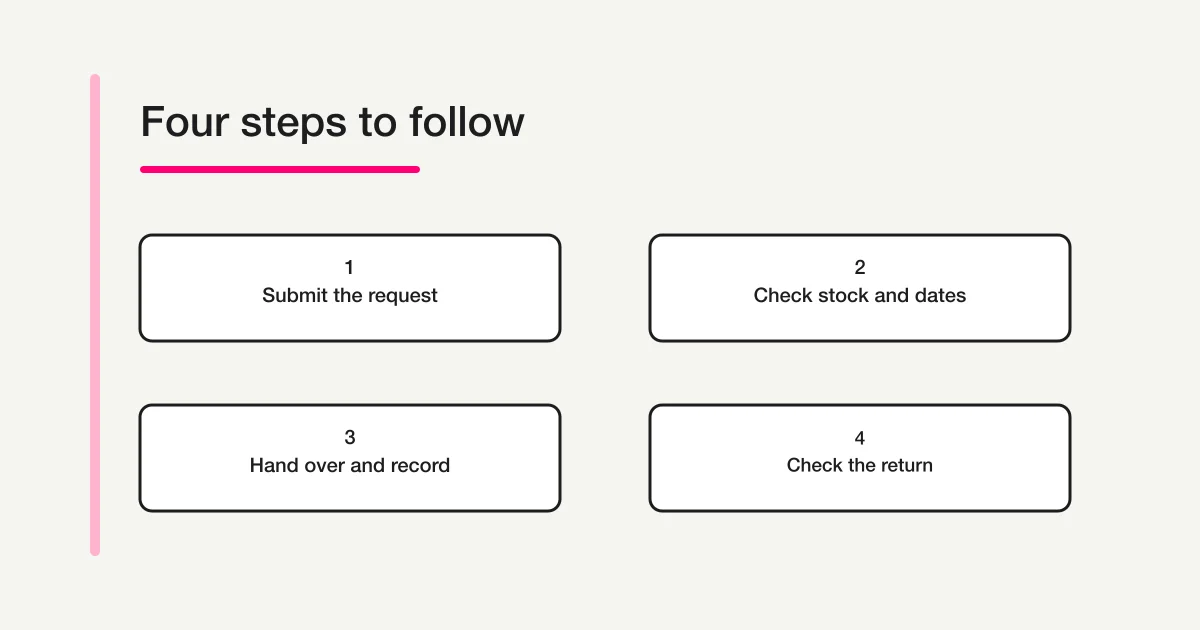
Define the route from intake to return
Use a completion message such as: “Your request has been received. A coordinator will check availability and contact you with the lending decision.” If you provide an automatic receipt email, use the same meaning. Give a response-time estimate only when your team can reasonably meet it.
Shijonawate City's community equipment guidance distinguishes the automatic response after an application from a confirmed reservation. In your own process, make it equally clear which message authorizes the borrower to come and collect the item.
A coordinator's management sheet might use stages such as received, under review, scheduled, on loan, and return checked. These are proposed record labels, not a claim that a form's response status automatically controls an inventory system. State where each stage is maintained and who is responsible for updating it.
Avoid treating a scheduled return time as an actual return. If the item has not arrived, the record remains open. If it arrives with a missing cable, the physical return and the unresolved accessory issue may need separate notes. A useful record tells the next coordinator what still needs attention.
Draft the intake form in FORMLOVA
FORMLOVA lets you describe a form in a supported AI chat and create a draft. Start with fictional equipment and review the questions before publishing. The form creation guide explains the broader process.
You can use a request like this:
Draft an unpublished internal equipment loan request form. Include borrower name, department, contact email, requested equipment, requested quantity, preferred collection date and time, preferred return date and time, and location and intended use. Add an optional notes field. Use a fictional meeting-room projector as the equipment choice. Explain that the quantity is a request and does not reserve stock. Make the completion message say the request was received and a coordinator will confirm whether the loan is possible. Do not publish the form or send emails.
Collect equipment requests in fields your coordinator can review
FORMLOVA's Free plan includes form creation and publishing, response collection, search, basic analysis, and CSV/Excel export. Start by reviewing an unpublished draft with fictional equipment.
Register free to draft an equipment request form
Register, confirm your email, connect FORMLOVA to a supported AI chat, and use the prompt above. Check your AI client's connection support, access requirements, subscription, and any separate charges with that provider.
After generating the draft, check the required fields, equipment choices, and the explanations beside dates and times. A numerical input limit can constrain the number someone enters. It does not establish that this quantity remains available after other requests are submitted.
Response search and spreadsheet export can help staff review requests. They do not, by themselves, allocate stock, prevent overlapping reservations, approve a loan, or update an existing asset register. If those functions are required, keep the responsible system and integration work explicit. Publishing the form is not evidence that such an integration exists.
Record what actually leaves storage
At collection, compare the confirmed arrangement with the equipment being handed over. If several items share a model name, record their asset identifiers on the coordinator side. Applicants usually need to describe a suitable equipment type rather than select a particular serial number before availability has been checked.
Check accessories alongside the main item. For the projector example, that might include the power lead, an appropriate connection cable, a remote, and a case. The actual list depends on what your organization lends. Note existing damage or a known limitation when it affects use or the return check.
If you use condition photographs, frame them around the equipment. Avoid capturing people, confidential meeting notes, or documents left near the storage desk. Store the images only where authorized staff can access them, following the same purpose and retention decisions as the rest of the loan record.
Record who collected the item, when it was issued, and any change to the agreed return arrangement. If someone collects on another person's behalf, use the organization's own authorization procedure. The form should not silently redefine that procedure.
Check the return before closing the loan
A borrower saying “returned” is useful information, but it is not the same as a staff inspection. Count the main items and accessories, compare them with the checkout record, and record the actual return time. If something is missing or damaged, leave a clear action for the person handling the issue.
Decide when equipment becomes available again. An organization may need a functional check, cleaning, or charging before the next loan. Do not mark an item available merely because its return was expected or because it has been placed near the storage area.
For the fictional two-projector loan, a return check should identify both units and the accessories issued with them. If one projector needs inspection, the loan record and the availability schedule should show the practical consequence. A general “complete” note can hide that one of the two units is still unavailable.
Handle changes, cancellations, and duplicate submissions
Give borrowers a defined route for changes. Ask them to quote a request reference or recognizable subject and describe the revised dates, quantity, or cancellation. Put that contact route in the completion message so they do not need to submit a second request simply to explain a correction.
Check new dates before releasing the original arrangement. If a cancellation is accepted, update the official schedule and record who handled it. Similar names or matching dates do not prove that two responses are duplicates; confirm whether they describe the same request before removing information.
Also define how late returns are reported. A changed return date can affect another borrower's confirmed arrangement. The coordinator's procedure should therefore include checking the schedule and contacting affected people when needed, rather than treating receipt of a change message as the end of the work.
Test on desktop and mobile before publishing
Use dummy applicant information and a contact address you control for your tests. Review the form as a borrower and then examine the response as a coordinator. Both sides need to be understandable.
| Test | What to check |
|---|---|
| Complete request | Item, quantity, collection, and return remain distinguishable in the response |
| Missing information | Required-field messages explain what is needed |
| Inconsistent dates | Staff know how to handle a return before collection |
| Overlapping requests | Neither submission is presented as an automatic stock reservation |
| Mobile layout | Equipment labels, explanations, choices, and submission remain usable |
| Completion message | The receipt and the coordinator's later decision are clearly different |
Check the intended audience and access settings as well. A link being difficult to guess does not establish that only staff can use it. For internal lending, review the available publication scope and permission settings against your organization's requirements before sharing.
Finally, test the staff handoff. Decide who checks new requests, where confirmed loans are recorded, and who covers absences. Clear questions reduce clarification work, but someone still needs to own the availability decision and the physical return.
Frequently asked questions
Can I keep my existing Excel loan log?
Yes. You can collect requests with a form and record confirmed loans and returns in your established log. CSV or Excel export is different from automatic synchronization. Decide which file or system is authoritative, and make its update part of the coordinator's routine.
Will a request form prevent double booking?
Intake alone does not guarantee stock allocation across multiple requests. A person must check overlapping periods and usable equipment, or a separate booking or inventory system must provide that control. Do not describe a successful form submission as a confirmed reservation unless the full confirmation process supports it.
Is a borrower-completed return field enough?
It can notify staff that equipment has been returned. Keep it separate from the staff check of actual units, accessories, and condition. Only promise the next loan when the item meets your organization's availability rules.
Related reading
For help choosing fields and required questions, see form field examples. The annual leave request guide offers another example of separating intake from a coordinator's decision. Equipment lending adds a further responsibility: checking the physical handover and return.
Disclosure and verification
Written by FORMLOVA's developer after checking the cited public guidance and the plan definition on October 29, 2026. The projector example is fictional. The university and city pages illustrate their own processes; their eligibility rules and lending conditions are not universal requirements. Adapt the template to your organization's equipment policies and official records.
