
An annual leave request form should collect the employee, requested date, supported leave unit, and contact details needed for follow-up. It does not need to ask every employee for a private reason. Submitting a form records an intake request; it does not, by itself, approve leave, calculate a remaining balance, or update timekeeping.
This guide provides a copy-ready field template and a review sequence for small teams. If your organization uses HR or timekeeping software, keep approval, entitlement, and final leave records in that system.
Decide what the request form does
Before building a form, decide which step it handles and which steps stay with a person or another system. If employees submit requested dates and a coordinator checks them against the work schedule before replying, the form's role is to collect the request and organize the information for review.
| Stage | What the form or coordinator does | Official record |
|---|---|---|
| Request | Collect requested date and leave unit | Response list or internal intake tracker |
| Review | Match the employee and date; check relevant schedules and policy | HR/timekeeping system or internal process |
| Reply | Tell the employee the request was received and share the result | The organization's chosen communication channel |
| Record taken leave | Record the leave that was actually taken | Official attendance and leave record |
If employees assume that a successful submission means approval, the form and the process can conflict. Use a confirmation message such as “We received your request. The coordinator will review it and follow up.” Keep intake and approval distinct.
The Japanese Ministry of Health, Labour and Welfare distinguishes employee-requested annual leave, planned leave, and employer-designated timing. It also describes an annual leave management record with each worker's timing, days, and reference date. A response list alone may not satisfy those recordkeeping or employer duties. Have your HR or labor-relations lead confirm the organization's process and records. See the Ministry's Annual Leave Timing Designation guidance. This article is an intake-form example, not legal advice or a compliance guarantee.
Annual leave request form template
The table below is a basic starting point for collecting requested annual leave dates. Keep only fields that fit your workplace rules, employment arrangements, and timekeeping system.
| Field | Example requirement | Design note |
|---|---|---|
| Employee name | Required | Use the name the organization recognizes |
| Employee ID or team | Only if needed for matching | Do not collect a second identifier if name and work email are enough |
| Contact detail | Required if a reply is needed | Choose an appropriate work contact channel |
| Requested date | Required | Decide whether the form accepts one day or a date range |
| Leave unit | Required | Show only units supported by the organization's policy |
| Handover or work note | Optional | Ask only for work-related details needed by the coordinator |
| Request acknowledgement | Optional or required by the process | Explain what happens after submission and whether approval is separate |
Do not make a diagnosis or detailed personal explanation a standard required field. If a coordinator needs to discuss coverage, ask separately for the work information needed to coordinate it. If an existing policy asks employees for a reason, have HR review whether the field is necessary and how the information should be handled.
Copy-ready question wording
Employee name (required)
Enter the name your organization uses to identify you.

Requested date (required)
Choose the date for which you are requesting annual leave.

Leave unit (required)
Choose an option supported by your workplace.
Example: Full day / Half day

Work handover note (optional)
Add any handover detail the coordinator needs to know.
Hourly annual leave is available only where the organization has adopted the arrangement and the applicable conditions are met. Do not include a leave unit that your workplace does not offer. For multiple dates, say whether employees should enter a continuous range or each separate date.
Make employee ID, department, or job type required only when the reviewer actually needs it to match the request. Collecting several identifiers just because the form can ask for them adds effort and keeps more information than the review may need. Decide how the request will be matched before adding fields.
Make the date and leave unit hard to misread
An open text field such as “When do you want time off?” leaves the coordinator to interpret different formats: 11/12, next Thursday, or November 12–14. Use a date control for the requested day and explain whether the employee should submit one response per day or one response for a continuous range. If the form accepts multiple individual dates, make each date visible in the response so the coordinator can compare it with the schedule.
The leave-unit question needs the same care. If the policy offers only a full day and half day, list those two options. If employees may request hourly annual leave, include it only after HR confirms that the organization has adopted the arrangement and which units it supports. A form should not offer an option that the organization cannot process. Do not infer a number of hours from a half-day choice unless the policy defines it.
Make examples match the input. For example, explain whether an employee selecting “Half day” must also choose morning or afternoon. If the form accepts a period, show the inclusive dates in the review view. These details reduce follow-up questions without asking for a private explanation of why the employee wants leave.
Keep the request form separate from a leave balance ledger
Employees may want to know how many days remain, but that answer depends on entitlement, prior leave taken, the reference date, and the organization's records. A standalone intake form does not know those facts unless it is connected to an authoritative HR system. Avoid a free-text “remaining balance” field as the source of truth: the employee and coordinator could enter different figures, and a copied form could preserve stale information.
If the organization already has a timekeeping portal, direct employees there for their current balance and keep this form limited to requests that the portal does not collect. If a small team uses a separate manual process, identify which person reconciles each submitted request with the current official record and when the updated balance is entered. Do not publish a form that displays another employee's requests or personal details to respondents.
Before launch, check who can view responses, how the coordinator downloads them, and how long a separate intake copy should remain available. Use the HR or timekeeping system's own retention rules for official records. Removing a response from a form does not necessarily remove a copied spreadsheet, notification, or official record, so document each destination before collecting real requests.
Choose a document or an online intake form
A Word or Excel request sheet may fit a workplace that requires a signed document or stores all employee requests in a controlled paper file. An online form may be easier when employees work across locations and the coordinator needs one searchable intake list. Neither format should become a parallel source of balances or approvals. If the HR portal already supports leave requests and confirms the current balance, use that route instead of creating a second submission path. The important choice is not the file type; it is whether employees know where to submit a request, who will see it, and where the final decision and taken leave will be recorded.
Review submitted requests
Choose a primary coordinator, a backup for absences, and a response target before sharing the form. Even a small team needs a fallback path so a request does not remain unseen when one person is away.
A reviewer can check the submission in this order:
- Confirm the employee against the organization's own records.
- Check that the requested date and leave unit are clear.
- Compare the request with relevant work schedules and the organization's process.
- Decide how and when to reply to the employee.
- Record the leave actually taken in the official attendance or leave system.
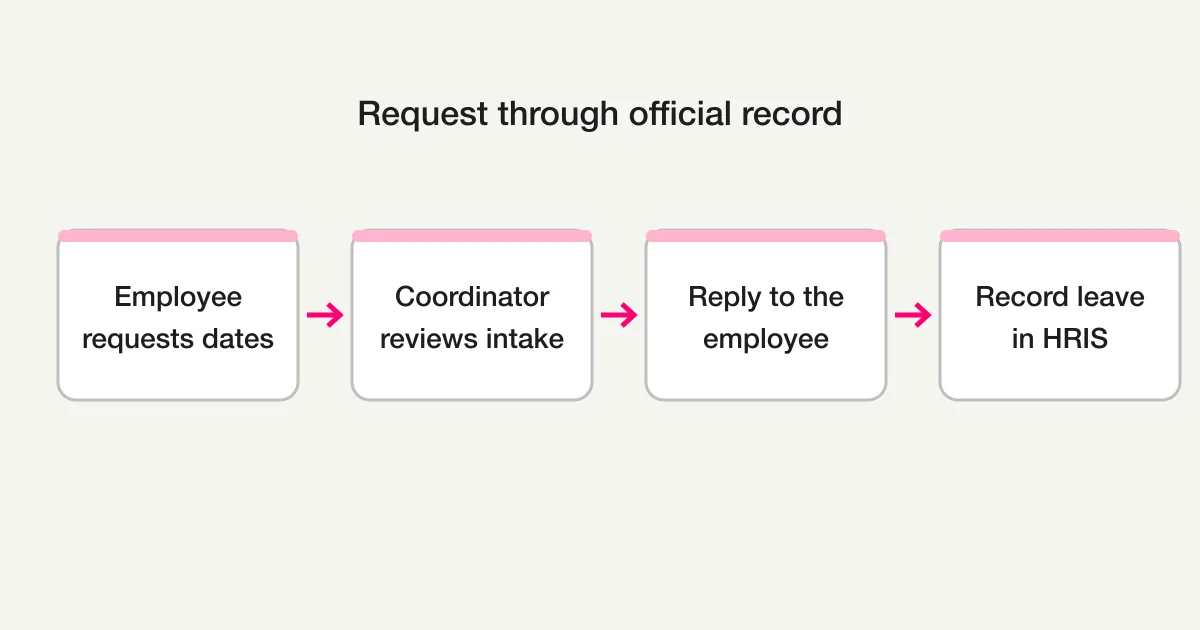
This review sequence does not automate an employment-law decision. The organization remains responsible for applying its policies and keeping the required records. Use status labels that reflect only the work actually completed, such as “received,” “under review,” and “reply sent.” If a separate system handles approval, do not label the form response “approved” before that system records the decision.
Test the form with a dummy response
Before publishing, submit one test using a fictional employee and date. Confirm that the date is saved as intended, the confirmation screen is clear, and the response reaches the right coordinator. Keep the test separate from actual requests or label it clearly, then verify that it does not remain in the live request list.
Example of a response list:
| Employee | Requested date | Leave unit | Intake status |
|---|---|---|---|
| Test Employee | November 12, 2026 | Full day | Test checked |
This is an illustration, not an actual employee request or a measured FORMLOVA result. Do not use a real employee's contact details or leave request for the test.
Decide how to handle a changed date or a second submission before employees start using the form. For example, the coordinator might ask the employee to reply through the official HR channel, then mark the original request as superseded in the intake tracker. Do not silently overwrite a response if the official process needs a history of what was requested and when. Tell employees which submission is current, and tell reviewers where to find the final decision. The form's response history is not automatically an approval or attendance log; reconcile the final outcome with the designated record.
If you send an automatic reply, distinguish “received” from “approved.” The immediate message can confirm the submission time and explain how the coordinator will follow up, without implying that the requested leave is confirmed. Reviewers should follow the same distinction and avoid copying a submitted date into the official attendance record before the organization's process is complete. Also tell employees how to reach HR if the form is unavailable, so they have a clear fallback intake route.
Draft the intake form in FORMLOVA
You can start with a request such as the one below to draft a form with an employee name, requested date, leave unit, and optional handover note. Before publication, a coordinator should adjust the options and confirmation wording to match the organization's actual process.
Draft an annual leave request intake form for our team.
Make employee name, requested date, and leave unit required.
Offer only full-day and half-day options.
Make the work handover note optional.
Do not ask for the reason for leave, a diagnosis, or the remaining balance.
After submission, say, “We received your request. The coordinator will review it and follow up.”
Do not approve leave, calculate balances, or update timekeeping. Show me the preview so I can check the fields and confirmation message.
Draft an annual leave intake form
Create and publish a form for free, collect and search requests, and export responses to CSV or Excel for review. FORMLOVA does not calculate leave balances, approve requests, or update timekeeping.
Sign up free to create the form
After signing up, verify your email and connect a supported AI chat client before pasting the prompt. Check the AI client's own terms and pricing separately.
Review the draft fields, confirm that the available leave units match your policy, and test the respondent preview. Then decide how the coordinator will compare the intake list with the official timekeeping record. For broader form planning, see the Form Creation Guide.
Pre-publication checklist
- Employees understand how their request will be matched to them.
- Date and leave-unit options match the organization's policy.
- A private reason is not collected as a default requirement.
- The confirmation message says whether this is receipt or approval.
- A primary coordinator, backup, and follow-up channel are set.
- A test response and notification have been checked.
- Employees and reviewers know where the official approval and leave records live.
An intake form gives employees a consistent place to submit requested dates. Confirm the workplace's actual policy and recordkeeping before using it, then connect the request process to the right HR or timekeeping system. For a different internal request, see the Expense Reimbursement Form Guide.
Frequently asked questions
Does an annual leave request form need to ask for a reason?
This basic template does not require a reason. A work handover note and a private explanation are different things. Ask HR to review whether an existing reason field is necessary for your process.
Does submission mean that the request is approved?
No. Submission confirms that the form received a response. If approval and the final reply happen elsewhere, tell employees where to expect that decision.
Can the response list serve as the annual leave management record?
Do not assume that the response list alone meets the organization's recordkeeping requirements. Check the Ministry guidance and your HR process, and keep the official record in the designated HR or timekeeping system.
Disclosure and Verification
The government information on annual leave was checked against the Ministry of Health, Labour and Welfare's public guidance on October 28, 2026. This article provides a form-design example, not individual employment-law advice or a guarantee that a form meets legal requirements.
