
Last updated: October 15, 2026
Design an order form around product, quantity, options, fulfilment, contact, payment instructions and change conditions. A submission does not reserve inventory, confirm an order or establish payment. Collection can start free; first decide whether you need a separate payment, inventory or delivery system.
Practical fields
| Information | Examples | Check |
|---|---|---|
| Product | SKU/name/options | Match the price explanation |
| Quantity | Units | Different from response count |
| Fulfilment | Pickup/delivery/date | Confirm available dates |
| Contact | Name/email/necessary phone | Limit required information |
| Address | Delivery only | Do not require for pickup |
| Payment | Method/deadline/evidence | Separate receipt from paid |
| Changes | Deadline/cancellation/contact/consent | Keep accessible after ordering |
Adapt products and fulfilment first. Where additional information such as food-allergy handling is needed, provide an accountable review process rather than an automatic assurance.
Test quantity and confirmation in a private draft
This is a proposed trial, not an operation or result measured for this rewrite. Use a private test draft first.
Create a private merchandise order-request form for T-shirts and totes. Ask size only for T-shirts, plus quantity, pickup/delivery, name and email. Ask address only for delivery. State that inventory is checked before confirmation; do not claim quantities reserve stock. Ask for prices, deadline and shipping rules. Do not publish, enable payment, charge or send.
Before proceeding, check:
- Do product, option, quantity and conditional fields match?
- Are response limits separate from total units and inventory?
- Do mobile/desktop explain pickup/delivery and the unconfirmed state clearly?
Draft a free intake before inventory confirmation
Free covers fields, logic, preview, response review/export. Card payment requires Premium and dashboard Stripe Connect setup; custom replies require Standard or above.
Create a free order-request draft
Register, verify your email, connect a supported AI client, and paste the proposed request above. Check the saved draft before publishing. AI-client account and usage requirements apply separately.
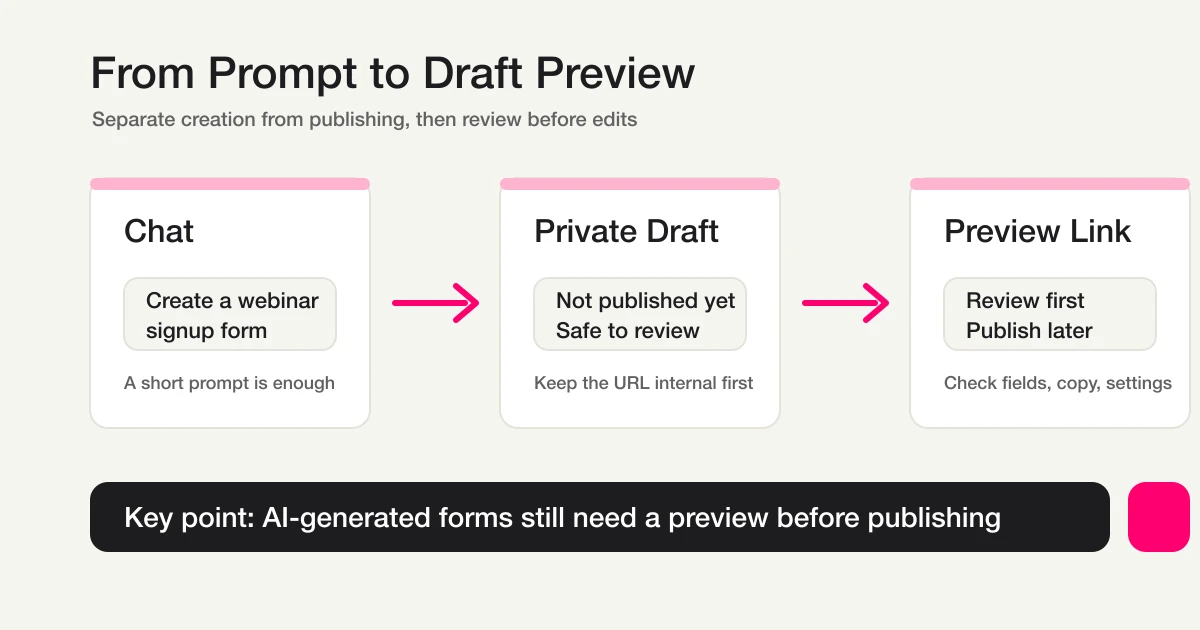
This existing conceptual diagram shows the draft-checking stage; it is not a screenshot or measurement of this article’s proposed test.
What Google Forms can cover
Google Forms can collect product, quantity, contact and fulfilment preferences, with Sheets for review. Explain receipt separately from confirmation. Current native closing dates/response limits do not reserve product-specific inventory or cap total ordered units.
Order stages versus response status
An organizer ledger may use received, checking stock, checking payment, preparing, fulfilled and cancelled. These are business stages, not arbitrary FORMLOVA status values. Use new / in_progress / resolved / spam in FORMLOVA, with retained tags/notes or a ledger for order stages and owners.
Verify payment in payment records and stock in inventory records. Marking resolved does not collect money or dispatch goods. Retrieve actual responses after updates.
Confirmation-copy example
Your order request has been received.
Inventory and the order are not confirmed yet.
We will review product, quantity and fulfilment, then send the confirmed details and payment instructions.
For changes/cancellation, use the stated deadline and contact route.
Replace timing with achievable conditions. Custom replies/reminders need Standard or above. Free owner response notifications are a six-hour digest outside outgoing-mail quota, a separate feature.
When orders arrive through DMs or LINE
A shared form can replace scattered product/quantity details. Confirm the request with the customer; do not silently ingest private conversations or promise complete historical transfer. External reads/writes need their own authorized integration path.
Payment, export and handoff
FORMLOVA card payment needs Premium. Connect onboarding, paid mode and price are configured in the dashboard. Common MCP does not return paid purchase URLs, QR codes or embeds; do not describe a chat-only sales-link workflow.
Basic CSV/Excel output contains fields and submission time, not guaranteed status/response-ID/owner columns. Keep ledger additions separately. Never infer or manually join raw email addresses from masked MCP display.
Pre-publish and operating checks
Check product/price/quantity, stock confirmation, deadline/timezone, fulfilment, delivery cost, change conditions, contact, consent, receipt wording and failure ownership. After publishing, verify actual storage separately from payment/inventory. Preview submission is not a complete sales test.
Questions and decision
Is it free? A request form can start on Free; payment and custom reply features have separate eligibility.
Can a response cap control inventory? Record count and units differ. Product inventory, multi-unit orders and cancellation returns need their own design.
Use the proposed draft to define what is requested and what must be checked before an order is confirmed.
Related Guides and References
- Form Creation Guide
- Registration Form Guide
- Reservation Form Guide
- Event Registration Form Guide
- Payment Form Guide
- Response Status Management
- Form Auto-Reply Email Setup
- Auto-Reply Email Examples
- Thank-You Page Guide
- Export Responses to CSV or Sync Them to Google Sheets
- FORMLOVA Form Automation Guide
- Post-Submit Workflow
- Form Publish Review Guide
- Paid Application Handoff
- Gmail Reservation Confirmation
- Slack + Sheets Log
- Unhandled Response Follow-up
- Google Docs Editors Help: View & manage form responses
- Google Docs Editors Help: Publish & share your form with responders
- Eventbrite Help Center: Create an event
- Eventbrite Help Center: How to access responses to custom questions
Disclosure and Verification
This guide is written by FORMLOVA’s developer. Product status, export, masking, notification and plan boundaries were checked against current specification/code on October 15, 2026. Business examples are hypothetical, not new execution results.
