
A customer service request form should support a decision from category, description, and a reference number. Urgency, refund eligibility, and response deadlines need an operator’s rules and review; submission alone does not decide them.
Last updated: July 2, 2026
A customer service request form has one job: turn "a customer needs something" into a piece of work your team can route, prioritize, and finish.
That means the form itself is only half the design. The intake fields decide whether a request is routable. The routing rules decide who owns it. The urgency handling decides what jumps the queue. The status schema decides whether anyone, including the customer, can tell what is happening.
If you only design the fields, you get a nicer inbox. Requests still pile up as unread messages, urgent ones wait behind routine ones, and customers write follow-up emails that just create more unrouted work.
This guide covers all four layers: intake, routing, urgency, and status. It also covers refund and policy-based requests, which need a different kind of status than ordinary service work.
The Short Answer
Collect name, email, a customer-readable category, a description, and a reference number when useful. Make uploads optional and add them only if the plan supports them. Map every category, including Other, to a reviewer.
Use urgency as a human triage decision based on impact and context, not a guarantee made by a dropdown. Refund decisions such as Approved or Processed belong in a separate business record. FORMLOVA’s response statuses are New, In progress, Resolved, and Spam; they do not create a customer-facing ticket portal automatically.
How This Page Fits Together With Related Guides
Several FORMLOVA articles touch what happens after a submission, so the boundary matters.
| If you want to know... | Read this |
|---|---|
| How to design the request form and its routing, urgency, and status schema | This article |
| How contact form operations fit together as a whole | Contact Form Response Management Guide |
| How to design response status as a general model for any form | Form Response Status Management |
| How to evaluate inquiry management tools and prevent missed replies | Inquiry Management From a Contact Form |
| How to set up routing in FORMLOVA step by step | Set Up Inquiry Auto-Routing With FORMLOVA Workflows |
This page owns the service request form. The linked pages own the surrounding operations.
Intake: Fields That Make a Request Routable
The purpose of every intake field is to answer one of three questions: who is asking, what do they need, and what do we need to act on it.
| Field | Why it earns its place |
|---|---|
| Name and email | You cannot reply or verify the account without them |
| Request category | This is the routing key. Keep it to five to eight options a customer can actually choose between |
| Description | Free text, with a short prompt like "What happened, and what would resolve this for you?" |
| Reference field | Order number, invoice number, or account email. One field, clearly labeled, optional if lookup is possible |
| File attachment | Screenshots and receipts resolve requests faster than three rounds of email |
| Consent checkbox | Required where privacy rules apply, and it sets expectations about how the data is used |
Two design rules matter more than any individual field.
First, every field must be consumed downstream. If nobody routes on it, replies with it, or reports on it, delete it. A shorter form gets completed; an interrogation gets abandoned, and the customer emails you instead, which puts the request right back outside your routing.
Second, the category list is a routing contract, not a taxonomy. Categories exist so a request lands with the right owner. "Billing," "Something is broken," "How do I...," "Refund or cancellation," and "Other" route cleanly. "General inquiry type A" does not. Write categories in the customer's words, and keep an "Other" option so people are never forced into a wrong category, which silently corrupts your routing.
A note on templates: a service request form template is useful as a starting checklist, but the category list and the reference field are the two parts you must adapt. They encode how your team is organized and how your customers identify themselves, and no template knows either.
Routing: Every Category Maps to an Owner
Map each category to an accountable reviewer and a fallback. Billing may go to finance, a reproducible bug to support, and refund requests to the person authorized to apply the policy. Put real owners and workable reply targets in the operating plan before enabling alerts.
Inquiry Owner Assignment is a reusable chat prompt for reviewing requests and suggesting an owner and next action. It does not start continuous monitoring or write a first-class owner field merely by being opened. Read existing notes and tags before appending a confirmed owner or deadline; preserve previous values. For configuration options, see the routing guide.
Urgency: Do Not Outsource Triage to the Customer
Ask what is affected, when it started, and whether there is a workaround. A customer’s urgency selection and keywords are signals; a reviewer decides whether escalation is justified. Do not promise emergency coverage unless a staffed process exists.
The urgent-keyword review prompt helps identify reasons for review when run in chat. A Slack handoff needs a separate connected Slack tool, write permission, a real destination, and a verified result. The prompt alone does not create an always-on alert. “Urgent” can be a preserved business tag or note; it is not a built-in response-status value.
Status: The Request Lifecycle
Use a business queue to track triage, waiting for information, escalation, and completion. Distinguish what the team knows from the message the customer has actually received.
FORMLOVA supports New, In progress, Resolved, and Spam as response statuses. Add business detail through existing notes or tags after reading their current values, or use a separate service record. Do not treat Waiting on customer, Triaged, or Excluded as supported status values. Mark a genuine request Resolved only after the required action is verified; classify noise separately rather than inflating the handled count.
The unanswered-inquiry review prompt is useful during a scheduled human review. A recurring digest runs only if an actual supported schedule is saved and checked; opening the recipe is not a schedule. See the general status model.
Refund and Policy-Based Requests Need Decision States
Refunds, cancellations, warranty claims, and similar policy-based requests look like ordinary service requests on the form. Operationally, they are a different animal, for one reason: the outcome is a decision, not just an action.
"In progress" tells a customer nothing useful about a refund. What they want to know is: has a decision been made, what was it, and when will the money move? So policy requests need their own state track:
| Status | Meaning | What the customer should hear |
|---|---|---|
| Received | The request is logged and the reference is verified | "We received your request and will review it within N business days" |
| Under review | Someone is checking eligibility against the policy | Nothing new needed if the review window was stated |
| Approved | The refund or change was granted | "Approved. You will see the refund within N business days" |
| Denied | The request does not meet the policy | The reason, stated plainly, and any alternative offered |
| Processed | The money moved or the change took effect | "Completed" with the confirmation details |
Three design consequences follow.
First, the form should collect eligibility evidence up front: the order or invoice number, the purchase date, and the reason. A refund request without a verifiable reference cannot even enter Under review, so make the reference field required for the refund category even if it is optional elsewhere.
Second, Approved and Processed are different states. A customer told "approved" who then receives no further update may open a second request. The gap between the decision and the money is exactly where trust is won or lost, so track it explicitly.
Third, Denied deserves as much care as Approved. A denial with a clear policy reason closes the loop; a vague denial generates an angry follow-up. If your denial rate for a given category is high, that is a form-design signal too: the policy should probably be stated on the form, before submission, in the agreement or description text.
You do not need a separate form for refunds. A refund category on your service request form, a required reference field for that category, and this decision-state track on the operations side cover it.
Test billing and how-to requests through one intake
Test whether category and a reference number support human triage. Treat self-reported urgency as context and read the actual impact before deciding priority.
Suggested request; this is not an executed configuration or result:
Draft a customer service request form with required name, email, category (Billing, How-to, Bug, Refund request, Other), and description. Reference number and impact are optional. Do not configure uploads or automatic alerts yet, and do not promise emergency response. Show the draft before publication.
Submit fictional billing and how-to requests and review owner candidates by category. Refund approval and processing are business decisions, not built-in response statuses. Test search, In progress updates, re-fetching, and CSV on Free. Uploads and custom acknowledgments require Standard or above; team permissions require Premium or above.
Start with this form on Free
Draft the fields above and test fictional saved responses, search, status review, and CSV. Evaluate uploads, custom replies, and detailed analysis under their separate plan requirements.
Create a free account and test this intake
After registration and email verification, connect a supported AI client and use the request above. Review the draft before test publication. AI-client access and fees follow its provider’s terms.
Where FORMLOVA Fits
FORMLOVA fits a small request intake where you want to draft the fields and review saved responses from a supported AI chat. Free covers forms, collection, search, the four response states, notes/tags, and CSV/Excel/JSON export. Export contains form fields and submission time, not internal ID, status, note, or tag columns.
Keep policy decisions, refund processing, staffing, and customer promises under human control. Tags and notes are not a refund engine or a customer-facing status page. Uploads and custom acknowledgments require Standard or above; detailed analysis and Sheets sync have their own plan requirements. Team permissions require Premium or above.
FAQ
What fields should a customer service request form have?
Name, email, a request category with five to eight options, a free-text description, one reference field such as an order number, and an optional file attachment. File uploads are available on the Standard plan and above. Add a consent checkbox where privacy rules require it. Delete any field that nothing downstream consumes.
Should the form ask customers to rate the urgency of their request?
You can keep a priority dropdown as a courtesy signal, but do not route on it alone. Combine it with what the category implies and what the request text says, and run an urgent-keyword escalation lane so genuine emergencies skip the queue even when the customer undersold them.
What statuses should a service request go through?
Use separate business classifications for triage and waiting. FORMLOVA’s supported response statuses are New, In progress, Resolved, and Spam; store other business facts in preserved notes/tags or a separate queue.
Do refund requests need a separate form?
Usually not. Add a refund category to your service request form and make the reference field required for it. Keep refund review, approval, and actual processing in a separate policy record. These are business decisions, not additional FORMLOVA response-status values or automatic refunds.
How is this different from inquiry management?
Inquiry management starts from the team's side: how to see, assign, and answer whatever comes in. A service request form starts from the customer's side: how to structure the ask so it arrives routable and trackable. If your problem is missed replies across all inquiries, start with Inquiry Management From a Contact Form instead.
Summary
Start with the article’s concrete request and review the saved draft. Publish a test only after review, then inspect fictional saved responses. Choose the paid mail, files, analytics, LINE, or integration features only when their specific operating need is clear. A recipe or suggested prompt is not a completed setup or measured result.
Disclosure and Verification
I wrote this as the developer of FORMLOVA, based on the design decisions behind FORMLOVA's request routing, urgency alert, and status workflows. The referenced workflows, Inquiry Owner Assignment, Urgent Inquiry Keyword Alert, and Unanswered Inquiry Digest, were verified as published in the FORMLOVA Workflow Place catalog on July 2, 2026. Plan boundaries for custom auto-reply emails were checked against FORMLOVA's plan definitions on July 2, 2026. This article makes no third-party product or pricing claims.
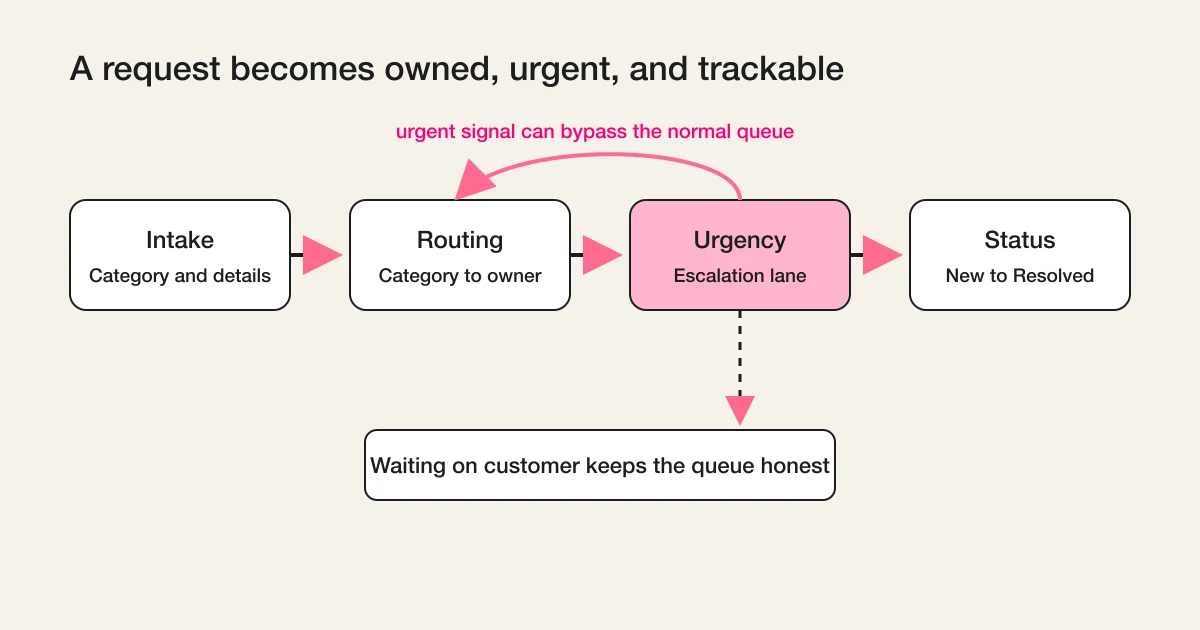
This is a conceptual operating flow, not a screen showing configurable native response-status values.
