
Last updated: October 15, 2026
Manage inquiries with See: identify unfinished work; Route: establish ownership; Act: reply and record progress. More notifications alone will not prevent missed enquiries. Each response needs a clear next owner, action and due time.
The model works across tools. FORMLOVA Free supports creation, response search and status work. Email routing/custom replies require Standard or above; shared team management requires Premium.
Start with an intake the owner can evaluate
Keep categories understandable, ask for the message and contact information, and assign a fallback for other enquiries. Draft the field-to-owner matrix before changing an existing live form.
Make one inquiry traceable
The following is a proposed trial request, not a result measured for this article. Use a test form before changing an existing live form.
Create a private test inquiry form with name, email, optional company, category (buying enquiry / existing-user question / billing / other), and message. Produce an ownership matrix and intake-to-completion checklist. Use new / in_progress / resolved / spam for status, and propose owner/due-date notes without deleting existing tags or notes. Label invented responses as hypothetical. Do not publish, send or change actual responses.
Check the output before proceeding:
- Who handles other and unassigned enquiries?
- Does status work identify the actual response before updating, then retrieve it again to verify?
- Are instructions/validation clear on phone and desktop without exposing internal owner details?
Try a free inquiry process that tracks unfinished work
Free includes drafting, response search and status management. Email routing/custom replies require Standard or above; teams require Premium.
Create an account, verify your email, connect FORMLOVA to a supported AI chat, then paste the proposed request above. Review the saved draft before publishing.
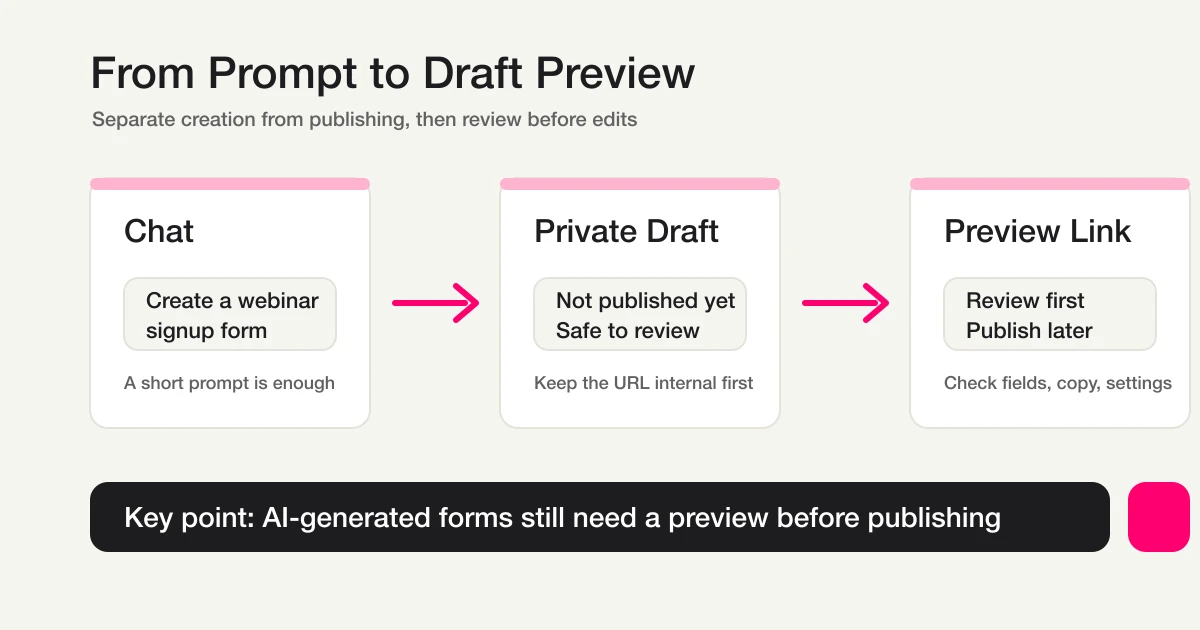
Review the saved intake and preview before deciding to publish.
See: define the period and unfinished responses
Choose the form and period for daily review. Separate total submissions, new/in-progress work, tests and classification exclusions. Once actual responses exist, a proposed read-only request is:
Confirm the target form and list this week's new and in_progress responses. Show count, category, submission time and whether a handoff note exists. Do not change anything. Ask if the target is unclear.
Statuses are new, in_progress, resolved and spam. Use tags/notes for business ownership or dates, retaining existing information when updating.
Classification is separate from status. Current labels are legitimate, sales, suspicious and junk. Sales exclusion removes sales and junk; suspicious and unclassified responses remain. Filtered responses are not automatically qualified leads or sales outcomes.
Route: connect categories, owners and fallback
Category rules reduce repetitive sorting, but selected categories can be wrong or incomplete. Assign someone to ambiguous and unmatched enquiries.
Email workflow actions require Standard or above. Inspect the form, conditions, destination, overlapping rules and enabled state. With authorized test recipients after publishing, check storage, execution, send result and receipt separately. Preview submission does not test actual response collection or delivery.
A notification is not a completed response. Confirm ownership before moving a real response to in_progress. MCP email display is masked; do not use displayed strings as raw recipient addresses or manual joins. Use supported response-recipient tools or server-side integration.
Act: distinguish receipt, resolution and evidence
A custom auto-reply acknowledges receipt and states an achievable response timeframe. Saved settings do not prove delivery. Check sender, unsubscribe handling, quota and errors. Response notifications and quota-counted outgoing mail have separate rules.
For individual replies, confirm the actual response, approved message and destination through the supported sending path. Inspect the send result, finish the required work, then update status and retrieve it again. An automatic acknowledgement alone is not grounds for resolved status.
Daily review checklist
| Moment | Check | Record |
|---|---|---|
| Start of day | new/in_progress, overdue work, unassigned enquiries | Scope/count and next owners |
| Handoff | Category, message and ownership acceptance | Owner note and next action |
| Before replying | Actual target, approved copy and send conditions | Send result and remaining work |
| Completion | All required work finished | resolved plus a completion note |
| Periodic review | Other, misclassification and notification failures | Changes to questions or conditions |
Questions and next step
What is free? Drafts, response review/search and status work. Custom replies/email routing need Standard or above; team collaboration needs Premium.
Should everything be automated? Separate routine acknowledgements and rule-based notifications from judgement and individual replies. Keep an owner for reviewing results.
Where should I start? Test one intake and its ownership matrix. Use the draft above to see whether questions, review, ownership and response records form a usable process.
Further Reading and Original References
- Contact Form Response Management Guide
- Form Response Status Management
- MCP form service guide
- contact form template guide
- Most Form Tools Stop at Creation -- FORMLOVA Starts After Publish
- contact form spam and sales-email defense guide
- How to Browse Responses and Manage Status
- How to Auto-Route Contact Form Inquiries by Category
- How to Send Form Responses to Slack -- Google Forms, Apps Script, and Follow-Up Design
- How to Set Up and Customize Auto-Reply Emails
- Inquiry Auto-Reply + Escalation
- How to Find and Apply Recipes from Workflow Place
- Why Your Form Auto-Reply Email Did Not Arrive
- Start free
- Setup guide
Classification References
- FORMLOVA Releases AI Sales Email Detection -- Classify Form Responses and Exclude Sales Pitches from Analytics
- Sales Email Detection Guide -- Enable Labels, Review Responses, and Clean Up Reports
- Why FORMLOVA Built Sales Email Detection -- Classify Contact Form Pitches Without Losing Real Inquiries
- Contact Form Spam Guide -- How to Stop Sales Pitches and Sort What Gets Through
Disclosure and Verification
This is an operations guide by FORMLOVA's developer. Plan, status and classification rules were checked against the repository on October 15, 2026. Requests are proposed examples; no actual response changes or email sends were performed for this rewrite.
